
Manage Revit Families All in One Place
Manage personal libraries, collaborate across teams, and load families directly into Revit—without searching through folders or outdated files.
Upload
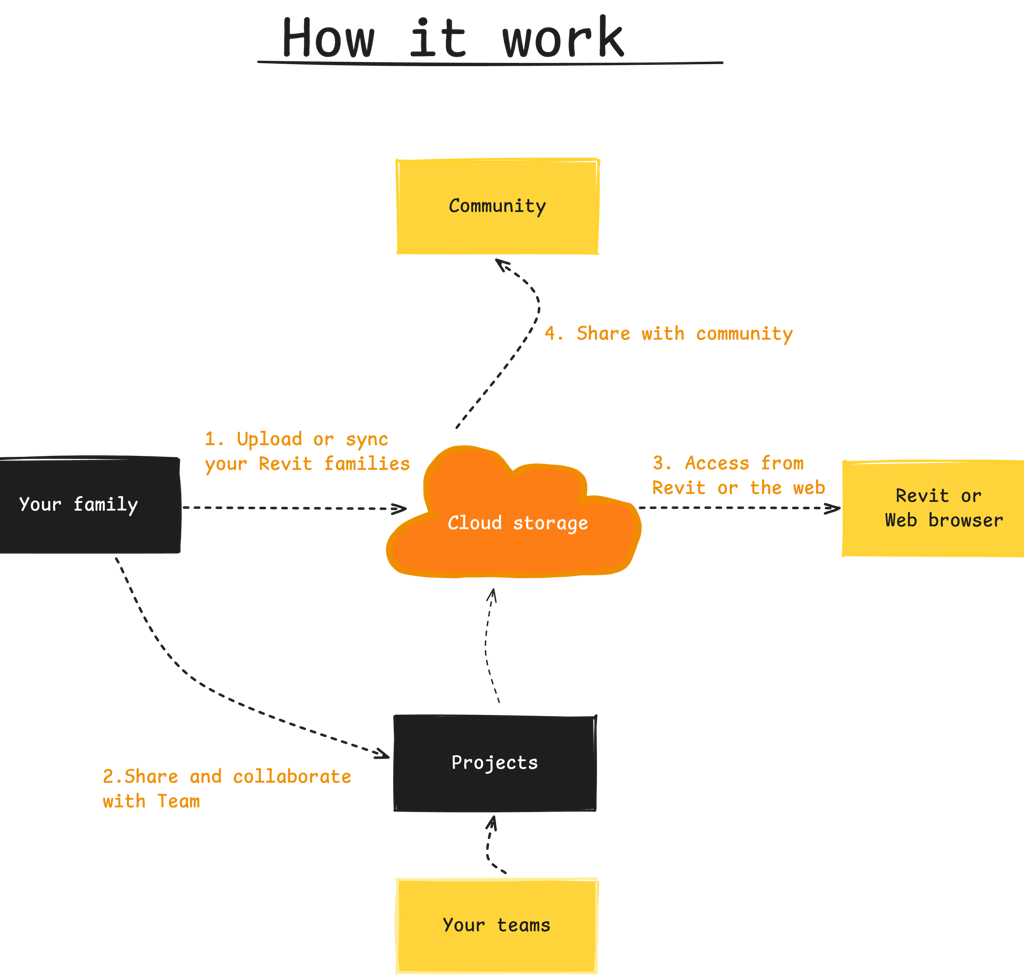
Bring Revit families in via drag-and-drop or sync; handles duplicates and places items into the right folders

Categories & Metadata
Auto-detect category, Revit version, parameters, and thumbnails so items are searchable and previewable.
Versioning for each family
Track current and previous Revit family versions with size, compatibility notes, and update flags.

Library
Browse by folder or category with filters/search; switch between card/table views; favorite and curate collections for quick reuse.
Share
Segment families by team/project; apply separate access rules so each workspace sees only what they need.
Workspace
Send families or folders with role-based access and expiring links; offer public gallery visibility when needed.


Project title
This project aims to develop a user-friendly mobile application that enhances productivity and organization. Through intuitive design and seamless functionality, users can efficiently manage tasks, set reminders, and collaborate with team members.


Project title
This project aims to develop a user-friendly mobile application that enhances productivity and organization. Through intuitive design and seamless functionality, users can efficiently manage tasks, set reminders, and collaborate with team members.
This project aims to develop a user-friendly mobile application that enhances productivity and organization. Through intuitive design and seamless functionality, users can efficiently manage tasks, set reminders, and collaborate with team members.
Project title


Project title
This project aims to develop a user-friendly mobile application that enhances productivity and organization. Through intuitive design and seamless functionality, users can efficiently manage tasks, set reminders, and collaborate with team members.
Built for architects, engineers, and BIM teams
Family Manager helps teams store, manage, and collaborate on Revit families in one place—so you can focus on design, not file management.
Designed by BIM professionals who work with Revit daily.
Pricing
Provide a general summary of the services you provide, highlighting key features and benefits for potential clients.
Pro plan
Best for professionals and BIM teams
Free plan
Best for individuals and personal libraries
100MB storage
Basic family browsing/import
1 workspace, 1 project create
Community, email support
$0 / month
$4 / month
100MB storage
Basic family browsing/import
1 workspace, 1 project create
Community, email support
Perfect for testing workflows or managing a small set of families.
Designed for collaborative projects and shared Revit libraries or managing a big set of families.
Get in touch


Questions about BIM workflows or enterprise use? Let us know.
Frequently asked questions
Can I use this directly inside Revit ?
Yes. Our add-in can be installed directly in Revit, allowing you to work seamlessly with cloud data inside your Revit environment.
At the same time, the Revit Family Manager is also a web-based platform.
You can access it from any browser without installing a plugin—simply upload your .rfa files and manage them online.
How do you handle Revit family versions?
Every time you upload a new version of a family, the previous versions are preserved.
You can: View full version history.
Compare metadata changes between versions.
Download any previous version at any time.
This ensures your team always works with the correct version while maintaining a complete history.
Is this suitable for BIM teams and companies?
Absolutely !. Revit Family Manager is designed for collaboration.
Create shared workspaces
Organize families into projects and collections
Manage access with role-based permissions
Allow your team to browse, search, and download from a centralized library
Which Revit versions are supported?
We support Revit family files (.rfa) from Revit 2020 and later.
How can I contact you?
You can reach us via: Email: contact@oceanbimcloud.com In-app feedback form
We’re always happy to help with questions, feature requests, or onboarding support.


Stay Updated
Get updates on Revit family management, new features, and BIM workflows.